

Skip to content
Brand · PH · EN

Colour theme

Region

Opens the same page on another regional site.

Philippines site language

English, Filipino (national language), or Tagalog. Applies to this regional site.

Search site

Search pages and articles

Ctrl+K · Search site
Menu

Radiology workflow

Cut consent delays and keep every form tied to the right study

RadForms helps imaging teams cut form-related delays while keeping each form tied to the correct study record. It replaces disconnected paper with digital forms that pull patient and study context from Modality Worklist or inbound HL7 orders, support signatures and structured capture, and route completed outputs into PACS. Optional pre-arrival SMS links, ClaveÚnica or LDAP identity integrations, and Entra ID or Microsoft 365 alignment can all be scoped by Trucell alongside your imaging workflow and network design.

View RadForms on Trucell

Step one gets questionnaires and consent onto the patient’s device or a controlled department device. Step two brings reception and modality teams together on one worklist view tied to scheduled work. Step three stores completed outputs as PDF or DICOM with the study for reporting and audit.

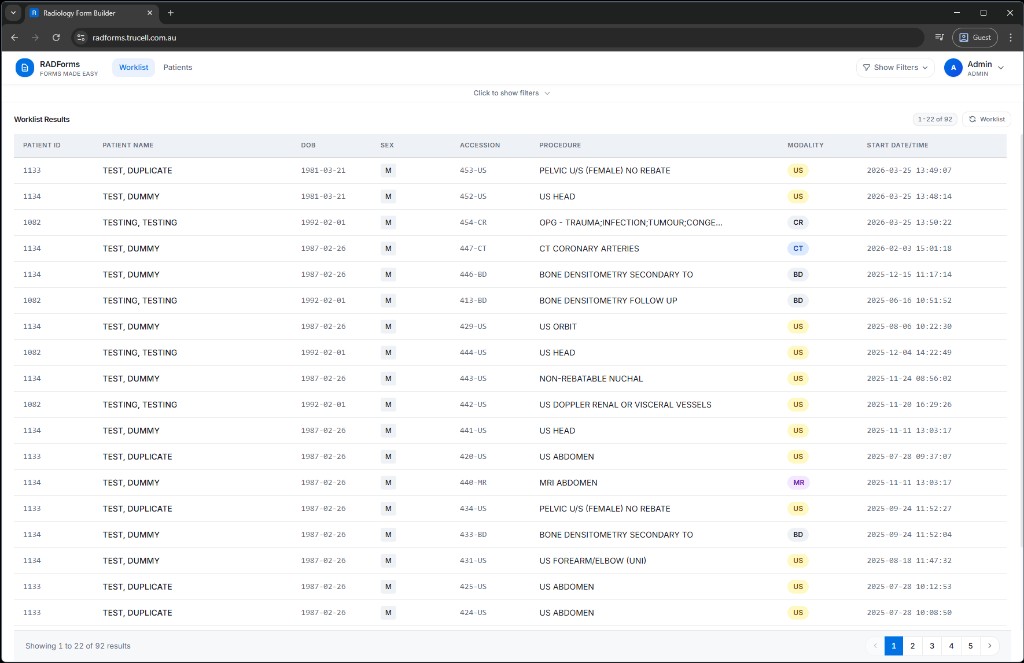
RADForms worklist showing patient rows with modality badges and procedure columns.

Radiology practices using RadForms subscriptions

Sites where RadForms pooled users, PACS destinations, trials, or SMS workflows are billed through Trucell, Australian imaging deployments.

We publish RadForms purchasers when subscription records align; licensing-only relationships may not appear.

Contact Trucell

Worklist to form, without guesswork

Bring PACS and RIS context into a single worklist, then open the right consent or intake form in a few clicks—on your workstation or by SMS and email to the patient.

In practice: capture and complete forms

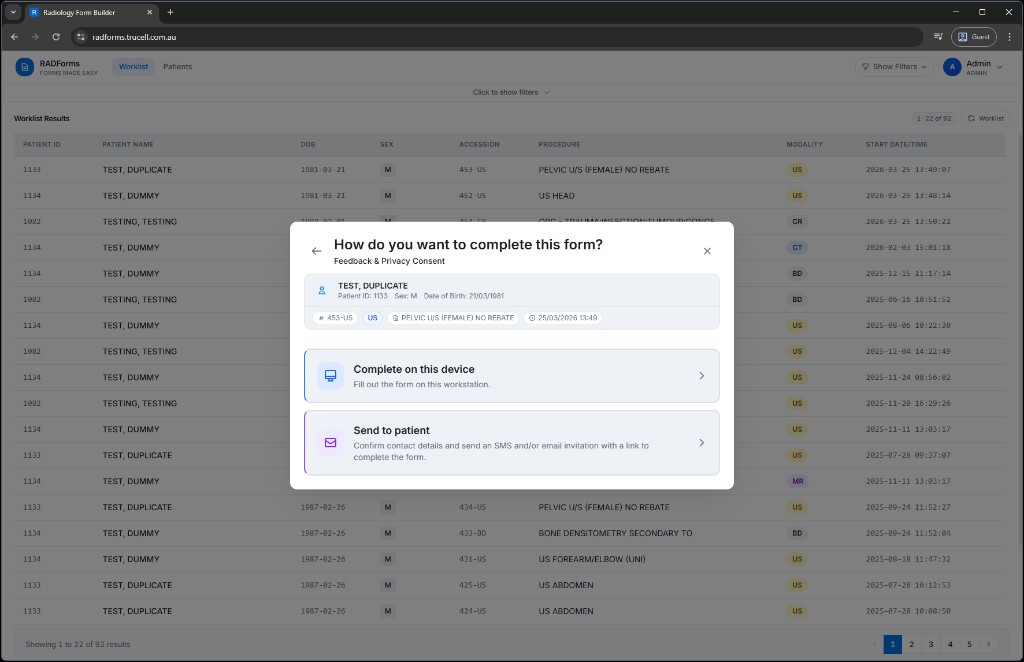
RADForms modal asking how to complete the form—on this device or send to patient.
Choose how each form is completed—fill on this device or send an invitation by SMS and/or email.
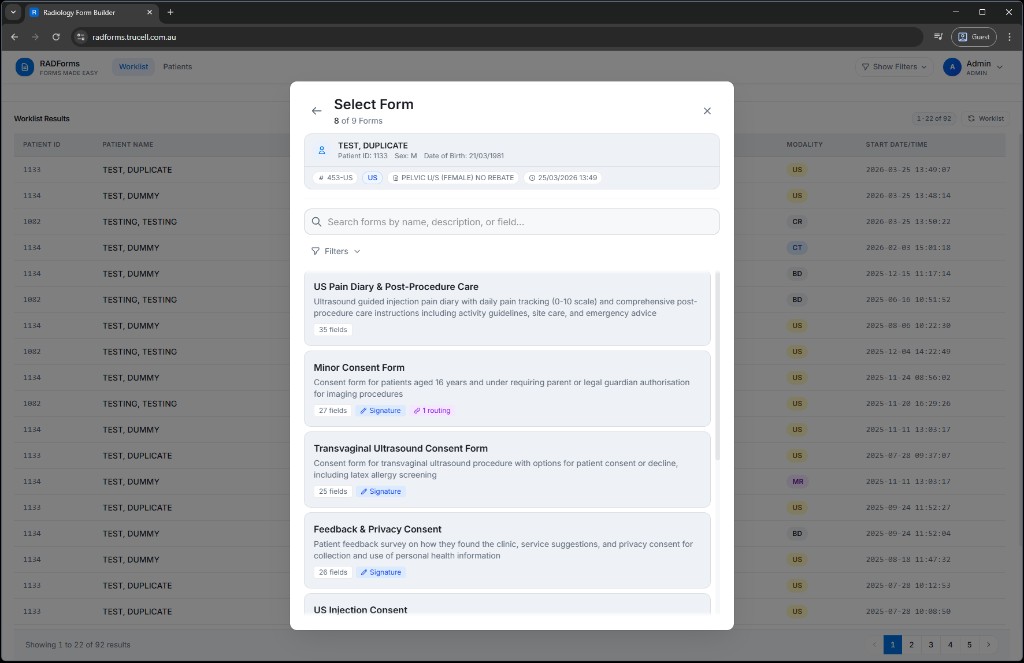
RADForms form picker showing searchable consent templates and metadata badges.
Pick from searchable templates with field counts, signatures, and routing visible before you start.
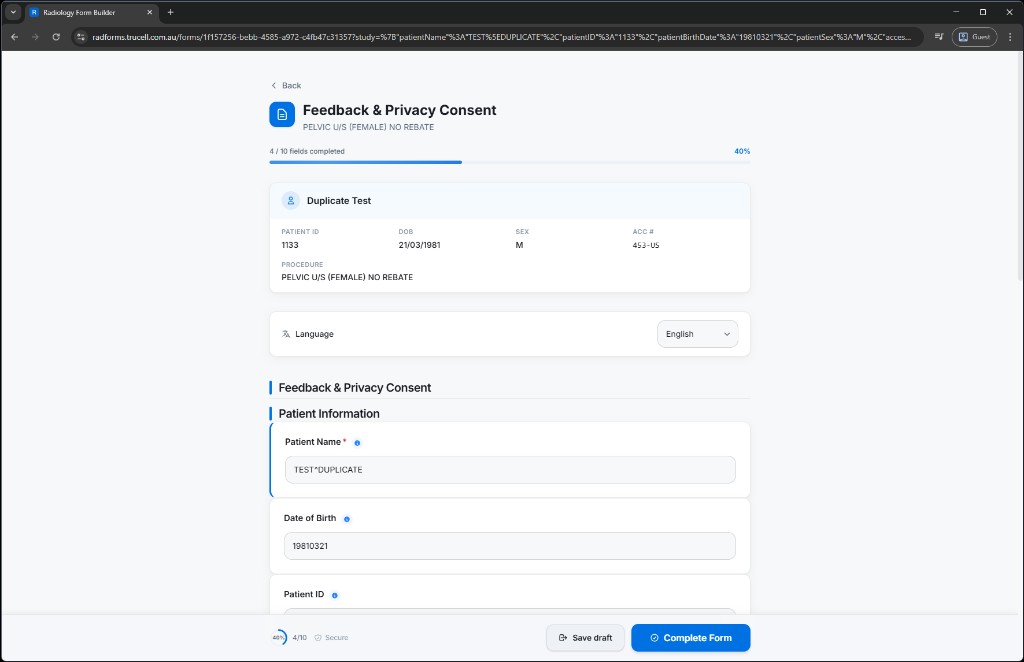
RADForms consent form with patient summary card, progress bar, and save or complete actions.
Patient banner, progress, language, and secure save—finish when clinical timing allows.

RadForms product walkthrough

A concise presentation on how RadForms fits radiology practice workflows—from Modality Worklist and tablet capture through to PACS and integrations.

Where paper consent and manual steps still hurt

Radiology teams lose time to forms that are not reliably linked to the study, hard to audit, and painful to feed into reporting, especially across sites and languages.

  • Consent or questionnaire data that is missing, misfiled, or re-keyed, delaying reporting and frustrating patients.
  • Handwriting and disconnected PDFs that do not flow cleanly into structured report context or voice templates.
  • No durable link between the form instance and the accession or study in PACS, so compliance questions get harder than they need to be.
  • Operational drag: staff shuttling paper, scanning, and chasing signatures instead of focusing on clinical throughput.
  • No pre-arrival channel: everything waits until the patient is in the building, instead of completing questionnaires on their phone days or hours ahead, the way travellers complete airline check-in before the airport.

RadForms covers both sides of the house: in-department completion from the Modality Worklist, and, where you wire inbound HL7, SMS invitations with time-limited links so patients can finish forms before arrival, plus reminders until they are done. Completed work still routes into your imaging record with signatures, PDFs, and PACS placement as configured.

The practical journey: patient, clinic, and record

RadForms is easier to assess when each role is visible. Here is how digitised imaging forms typically move from capture through reception and modality work into your governed imaging record, without relying on loose paper.

  • Which forms leave paper behind

    Consent packages, safety and screening questionnaires, contrast or MRI safety checklists, pregnancy declarations, referral-linked histories, and other centre-specific templates can be rebuilt as structured digital forms with translations and conditional branches. One governed template set replaces parallel paper variants across sites or languages.

  • Who completes them

    Patients often complete forms first: on their own phone via a secure, time-limited SMS link before arrival when inbound HL7 orders match your invite rules, or on a tablet or kiosk in the department. Staff also complete or assist from the Modality Worklist when the workflow needs a radiographer or nurse to confirm details or capture signatures. Where your deployment requires it, patients can authenticate with ClaveÚnica during completion so verification state stays on the record.

  • How the clinic receives and manages intake

    Operators work from one RadForms worklist fed by scheduled DICOM Modality Worklist rows and, where configured, inbound HL7 orders, so bookings and imaging work appear together instead of on separate clipboards. Opening a study shows which forms apply, what is still incomplete, and what has already been submitted. When SMS pre-arrival is enabled, reminders can chase incomplete patient steps until submit or expiry, reducing last-minute desk-side chasing.

  • How information is validated

    Templates enforce required fields, conditional branches, and field types suited to clinical capture (including signatures and diagrams). Identity checks can be layered where policy demands them. Behind the scenes, role-based access and session controls align with the secure access patterns you configure with Trucell, so only appropriate roles alter templates, release invites, or view patient submissions.

  • How privacy and custody are handled

    Patient invite links are time-limited and delivered over HTTPS; workforce access follows JWT-backed sessions and role boundaries with audit-friendly behaviour on the application stack. Pair RadForms with your organisation’s identity standard (for example Microsoft 365 and Entra ID , LDAP, or mandated national identity) so workforce sign-in matches how you already govern clinical systems, rather than introducing a disconnected account silo.

  • Why intake and administration improve

    Front desk and modality teams spend less time scanning, stapling, and re-keying handwriting when structured answers arrive early and route automatically. Reporting gets consistent clinical context, and governance reviews can rely on study-linked PDF or DICOM artefacts in PACS instead of hunting folders. The result is shorter delays at check-in, fewer missing consent blocks on the reporting path, and administration that scales across sites without multiplying paper procedures.

What RadForms delivers in the department

The application connects scheduled work to digital forms, at the modality, on a tablet, or on the patient’s own device before they arrive, then pushes completed artefacts into your imaging environment so the right data is with the right study.

  • Live Modality Worklist

    Query and present scheduled procedures with filtering by date, site, modality, and search. Open a study and attach the correct forms with demographics and study metadata carried from the worklist.

  • SMS invitations & pre-arrival completion

    When inbound HL7 orders match your form-SMS rules, RadForms can send a text with a secure, time-limited link to the right templates, so patients complete questionnaires before the visit (think airline-style check-in, not a clipboard in the waiting room). Configurable reminders chase incomplete forms until they submit or the invite expires; completion stays tied to the order and flows through the same downstream routing.

  • HL7 orders in the same worklist

    The worklist can switch between DICOM Modality Worklist rows and inbound HL7 orders, so staff see orders and imaging bookings in one place when your integration path uses HL7 alongside or instead of MWL.

  • Form builder & completion

    Design templates with conditional logic, translations, and field types suited to clinical use, including signatures, body diagrams, scales, and camera capture. Map fields to DICOM tags where it saves double entry.

  • PDF generation & PACS routing

    Completed forms can be rendered to PDF and sent into your workflow as DICOM, so documents land with the correct study and remain part of the permanent record alongside images.

  • Structured context for reporting

    Capture structured answers that integrate with how your team dictates or templates reports, reducing transcription from handwriting and keeping clinical context consistent.

  • Multi-language, multi-site

    Support patient-facing language where you need it and manage templates consistently across locations, without maintaining parallel paper versions.

  • ClaveÚnica & LDAP

    For Chilean public-sector and regulated workflows, RadForms supports ClaveÚnica, Chile’s government OpenID Connect identity. Staff can sign in with ClaveÚnica where it is enabled, and form templates can require ClaveÚnica verification so patients authenticate during completion; verification is persisted on the record. LDAP is also supported for directory-backed sign-in where you standardise on Active Directory or another LDAP directory alongside or instead of local accounts.

  • Secure access model

    JWT sessions, role-based access, and audit-friendly patterns on a modern web stack. Pair with Microsoft 365 and Entra ID for device and workforce identity where that is your standard; use ClaveÚnica or LDAP where those are the mandated or preferred paths.

Subscriptions & licensing

RadForms follows an Office 365-style license pool: you purchase subscriptions by type, assign them to specific users and integration endpoints, and return seats to the pool when you change topology. Billing is subscription-based (Stripe checkout can provision licenses where enabled), not per completed form. Trucell quotes Australian pricing, currency, and packaging for your user count, MWL connections, and PACS destinations; we do not publish a fixed global rate card here.

  • User subscriptions

    Covers staff who sign in to RadForms, worklist, form builder, administration, and reporting. Licenses live in a pool: assign a seat to a person, move it when roles change, and scale the pool up or down with your agreement.

  • MWL server subscriptions

    Each configured Modality Worklist connection that runs live queries needs an entitlement. Without a license or an active trial for that server, MWL operations are blocked until you assign capacity or start the entity’s trial.

  • PACS destination subscriptions

    Each PACS routing endpoint you send completed PDFs or DICOM to consumes a destination entitlement. If routing is blocked for licensing, work queues until you assign a license or complete trial setup, then pending sends retry automatically.

  • Trials & metering

    Each user, MWL server, and PACS destination can use a one-time 30-day trial (started explicitly, trials do not auto-fire). There is no per-form charge in the product model: cost scales with pool size and integration footprint, not document volume.

Licensing dimensions

At a glance

Three billable dimensions, stacked as needed. Dollar amounts are quoted; nothing is published here.

People & access

User

What it entitles
Named use of RadForms for staff accounts (roles, worklist, builder, settings).
How it works
Pooled seats; reassign when people change role or leave.

Worklist integration

MWL server

What it entitles
Live Modality Worklist query path for one configured server.
How it works
One subscription per MWL integration you enable under license.

Imaging destination

PACS destination

What it entitles
Outbound routing of completed forms/PDF to one PACS AE title / destination.
How it works
One subscription per destination you attach in routing.

List pricing depends on region, volume, and whether professional services are bundled. Ask Trucell for a written quote against your MWL count, PACS destinations, and user seats, including trial windows for new endpoints.

What success looks like, and what it avoids

When RadForms is scoped correctly, teams spend less time chasing paperwork and more time moving studies through the reporting path with reliable audit context.

When rollout is done well

  • Patients complete forms earlier, with fewer desk-side delays and fewer missed details at check-in.
  • Study-linked forms, signatures, and PDFs route consistently into PACS and are easy to retrieve during governance reviews.
  • Radiographers and admin teams spend less time scanning and re-keying, and more time on throughput-critical work.

When paper or disconnected forms remain

  • Consent and questionnaire context stays fragmented across clipboards, scans, and disconnected folders.
  • Reporting and compliance reviews still rely on manual lookups, with no clean study-level traceability.
  • Operational friction persists: queues build at reception while staff chase signatures and missing data.

Buyer checklist before you shortlist vendors

Use these checks to compare RadForms with alternatives on operational reality, not feature lists. This helps teams avoid low-price selections that fail at rollout.

  • Workflow fit and completion path

    Confirm whether forms are attached from MWL and HL7 orders in one operator view, and whether pre-arrival SMS invites can be enabled with reminders. If your team still has to manually reconcile records, risk remains.

  • Identity and audit requirements

    Check if your required identity path is supported (ClaveÚnica, LDAP, or Microsoft identity), and verify that signatures and verification state persist with the study-linked record for compliance evidence.

  • Licensing and scaling model

    Request written pricing for users, MWL servers, and PACS destinations with trial terms and support scope. This avoids hidden constraints after go-live and gives finance a clean comparison model.

How Trucell helps you deploy and run it

We scope RadForms beside your imaging estate, networks, and identity, not as a standalone app handover. Across 50+ healthcare sites, delivery typically moves through connect, configure, pilot, and steady-state support.

  1. Connect & scope

    Align Modality Worklist endpoints, PACS routing targets, and network paths with your PACS & RIS architecture. If you use the HL7 and SMS path, we also line up inbound order feed, a public HTTPS base URL for patient invite links, and SMS provider settings, so pre-arrival texts and reminders work in production, not just in a demo.

  2. Identity & devices

    Line up sign-in, roles, and tablet or workstation deployment with Microsoft 365 and IT support where that is your pattern, and configure ClaveÚnica or LDAP in RadForms when your deployment requires government identity or directory-backed auth instead.

  3. Pilot & training

    Prove templates, languages, and routing rules with a controlled site or modality mix before you scale, adjusting rules so the worklist always opens the right form set.

  4. Operate

    Keep imaging workflows and endpoints on supported footing: changes to worklist, storage, or security feed through the same teams that already cover your clinical IT.

Send a quick RADFORMS scope brief

Share your workflow context and timeline. We will reply with a practical implementation and support pathway.

Work email, name, and clinical context are required. Optional details help us prepare your call.

Work email, name, and clinical context are required. Optional details help us prepare your call.

Optional — add organisation, timing, and notes when you are ready.

Add organisation, timeframe, location, phone, and notes

Optional — fastest way to reach you for the readiness call.

We use this information only to respond to your enquiry and scope next steps. Unsubscribe anytime from marketing email.

We typically reply within one business day. No spam — ever.

Use full contact form

Ready to replace paper without breaking throughput?

Share expected user seats, MWL servers, PACS destinations, and whether you need pre-arrival SMS forms. We will return a practical licensing and rollout recommendation you can compare against your current process. No obligation.

Frequently asked questions

Common planning and rollout questions for RADFORMS environments.

What information helps scope a RADFORMS deployment?

A strong starting brief includes current reporting workflow, integration points, user groups, and timeline. That is usually enough to define an implementation path.

Can RADFORMS be aligned with existing imaging systems?

Yes. We can scope RADFORMS rollout with existing PACS, RIS, and supporting infrastructure so operational ownership remains clear.

Do you support both implementation and ongoing support?

Yes. We can assist from scope through deployment and then align managed support responsibilities for run-state operations.

What problem does RADFORMS solve for our practice?

Reporting, billing alignment, and workflow consistency break down when imaging systems, form design, and revenue paths are scoped in isolation. RADFORMS work is about reliable radiology reporting and operational handoffs your team can run day to day, not only a successful go-live.

What does Trucell provide through implementation and run-state?

Rollout planning with your clinical and billing stakeholders, integration and environment fit, user cutover support, and—where you engage us—managed pathways with clear ticket ownership for issues that are not vendor product defects alone.

Why work with Trucell versus deploying RADFORMS with a generic IT provider?

Australian imaging workflows, RIS/PACS realities, and support expectations differ from generic business IT. Trucell frames scope in those terms, names integration and operational risks up front, and can carry the same service discipline as the rest of your Trucell estate when you want one accountable partner.

Services that deliver this solution

Trucell service lines that scope, implement, and run the work behind this solution—with ownership and evidence your teams can trace through procurement and assurance reviews.